


Best Apps for Saving Money UK: A Practical Shortlist
Most money apps help after the money has gone. The best ones also help right before you spend. This guide breaks the best apps for saving money in the UK into five useful categories, so you can pick the one that matches your real life and install with confidence.

Quick Pick
Pick your money-saving app like this
- If you don’t know where the money goes, start with a budgeting or aggregation app.
- If your bills feel too high, add a bill-switching service.
- If you struggle to keep savings separate, use savings pots.
- If you’re spending anyway, add one cashback app (but avoid collecting five).
- If your problem is impulse spending at checkout, use a “spend less in the moment” tool.
Most people end up with two apps: one for visibility and one for the moment decisions happen.
Selection criteria (so this list stays practical)
When people search for best apps for saving money UK, they’re usually close to installing. So we kept the selection criteria simple and real-world:
- UK fit: works with UK accounts, bills, or retailers.
- Low friction: easy to start, easy to keep using.
- Clear benefit: it either reduces a cost, increases savings consistency, or helps you spend less.
- Transparent trade-offs: we call out where a type of app may not suit you (data sharing, effort, or “only saves if you remember”).

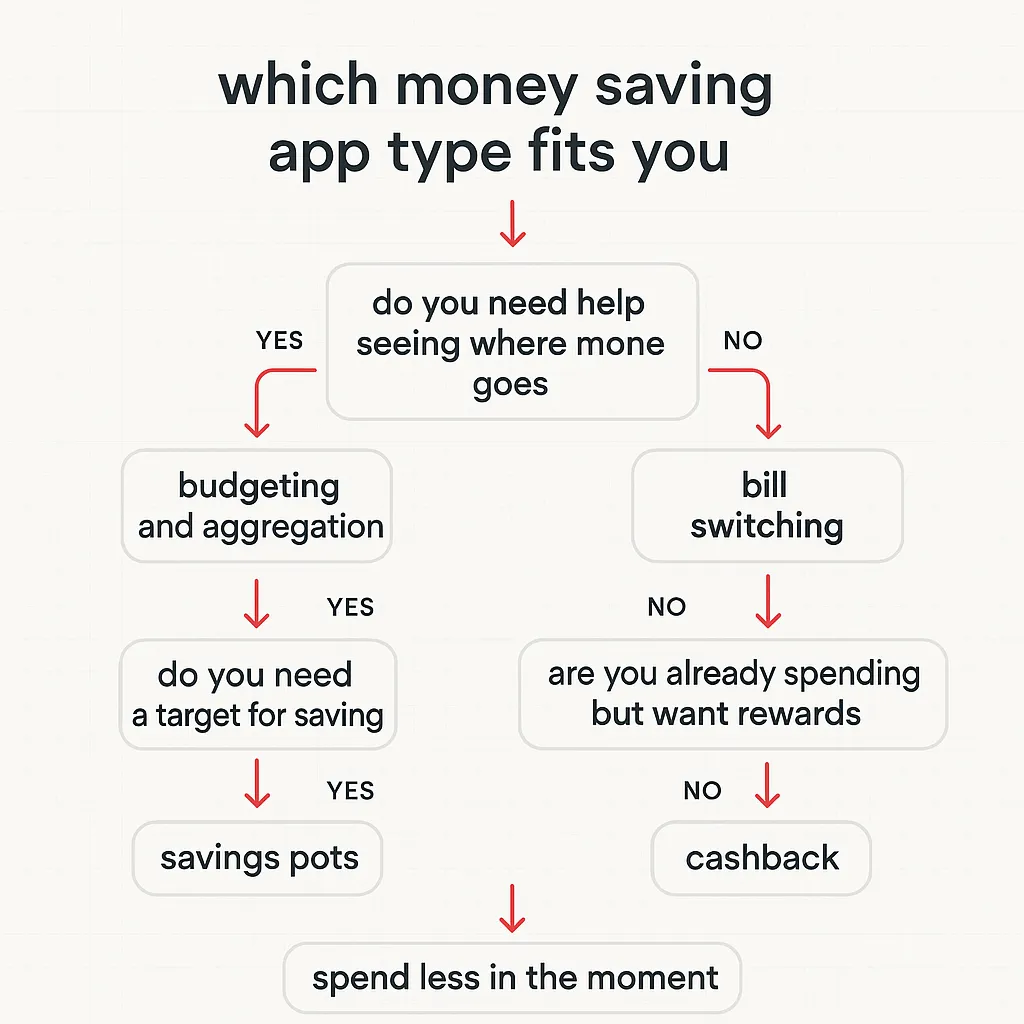
Which type should you pick? Use this flowchart
If you want the short version, choose based on your most repeated moment: after you spend, or right before you spend.
Budgeting and aggregation apps (see where money goes)
These apps are best when your biggest need is visibility: categories, trends, subscriptions, and “what changed since last month”.
If you want a deeper best-fit guide on one popular option, see Snoop Budget App: Best-Fit Guide and Calm Alternatives.
Budgeting and Aggregation: Quick Pros and Cons
| What it helps with | Pros | Cons |
|---|---|---|
| Spending categories and trends | Fast clarity without spreadsheets | Works best if transactions are accurate and categorised well |
| Subscriptions and recurring payments | Good for spotting quiet leaks | Still requires you to cancel and follow through |
| Habit building | Weekly review makes change feel manageable | If you hate ‘checking in’, you may stop opening it |
Tip: if you only do one thing, do a 10-minute review once a week. That is usually enough to spot patterns.

Bill-switching apps (lower the fixed costs)
Bill-switching services can be a strong win because they target the stuff you pay every month: energy, broadband, mobile, insurance. If you switch once, you can benefit for months.
A quick way to use switching tools
- Pick one bill you pay monthly.
- Check the renewal date, then set a reminder 2–4 weeks before.
- Switch, then put the new amount into your savings pot or goal.
If switching stresses you out, start with the simplest: mobile or broadband. Build confidence first.

Savings pots apps (separate money into goals)
Pots solve a simple problem: money that is visible gets spent. If you struggle to keep “future me” money separate, pots help.
Good use cases:
- Short goals: a weekend away, Christmas, car repairs.
- Buffer building: an “oh no” fund for small surprises.
- Bill smoothing: setting aside monthly for annual costs.

Cashback apps (get paid for spending you already do)
Cashback is best when you’re buying essentials anyway and want small wins. The risk is using cashback as a reason to buy extra stuff.
Cashback: Keep It Helpful
| Rule | Why it works |
|---|---|
| Use cashback for planned spending | Rewards feel like a bonus, not permission to impulse buy |
| Keep to one or two cashback apps | Too many apps means you stop checking them, and rewards get missed |
| Cash out on a schedule | Turning points into cash keeps it real and motivating |
If cashback makes you browse for ‘deals’, pair it with a pause tool so you still choose intentionally.

Spend less in the moment tools (pause before you purchase)
If you already know the right advice but still overspend, you don’t need more information. You need help with the moment the decision happens.
This is where 118M8 fits. It’s built to make spending feel personal and slower, without guilt or lectures.
Spend Less in the Moment
118M8: Spot it. Clock it. Choose it. Pause it.
Open the app right before you buy. You get a calm pause, then you decide.
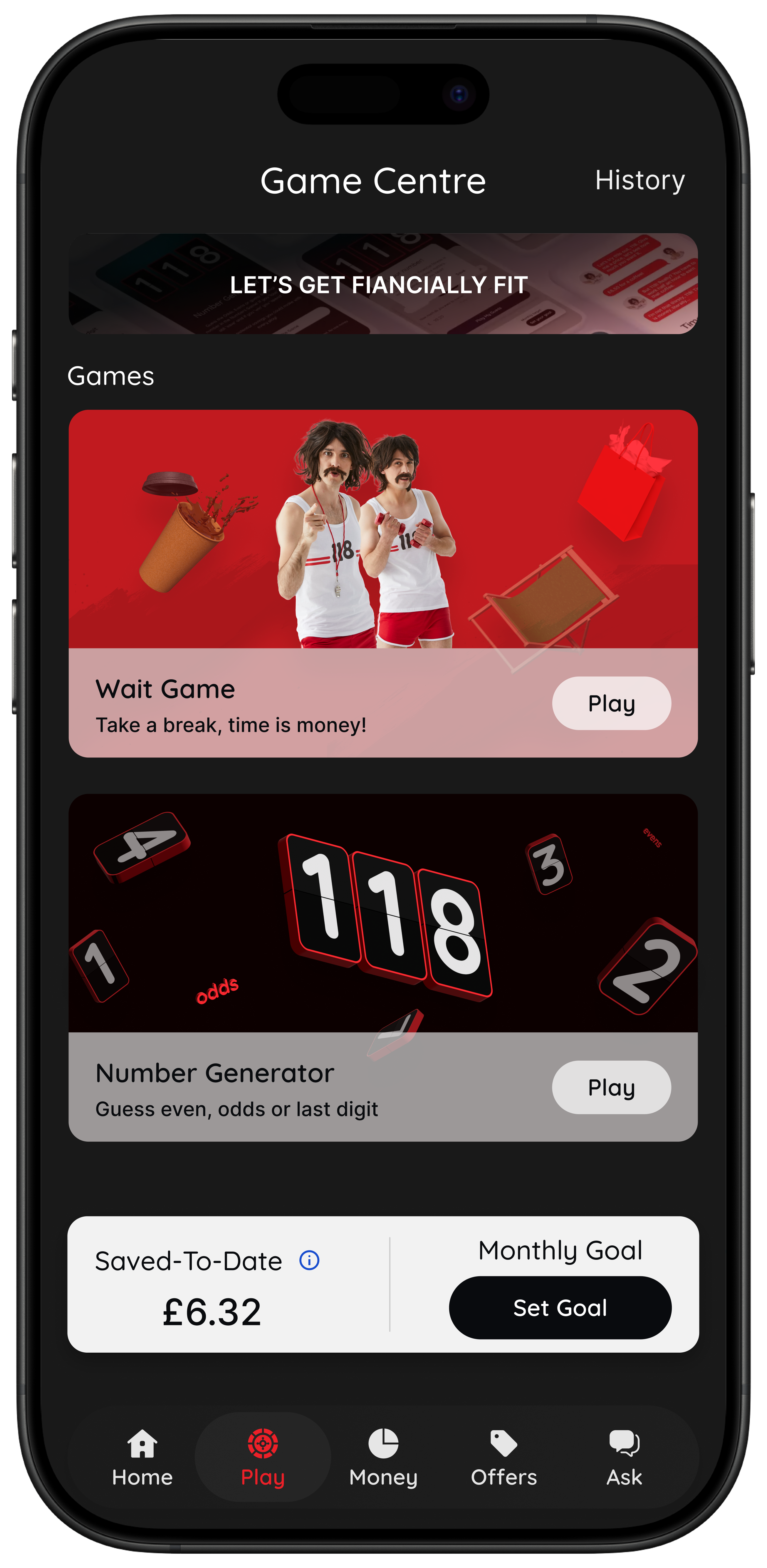
- Wait (Clock it): convert a price into the hours you would need to work to earn it.
- Sleep on it (Pause it): set a 24-hour reminder for a purchase you are unsure about.
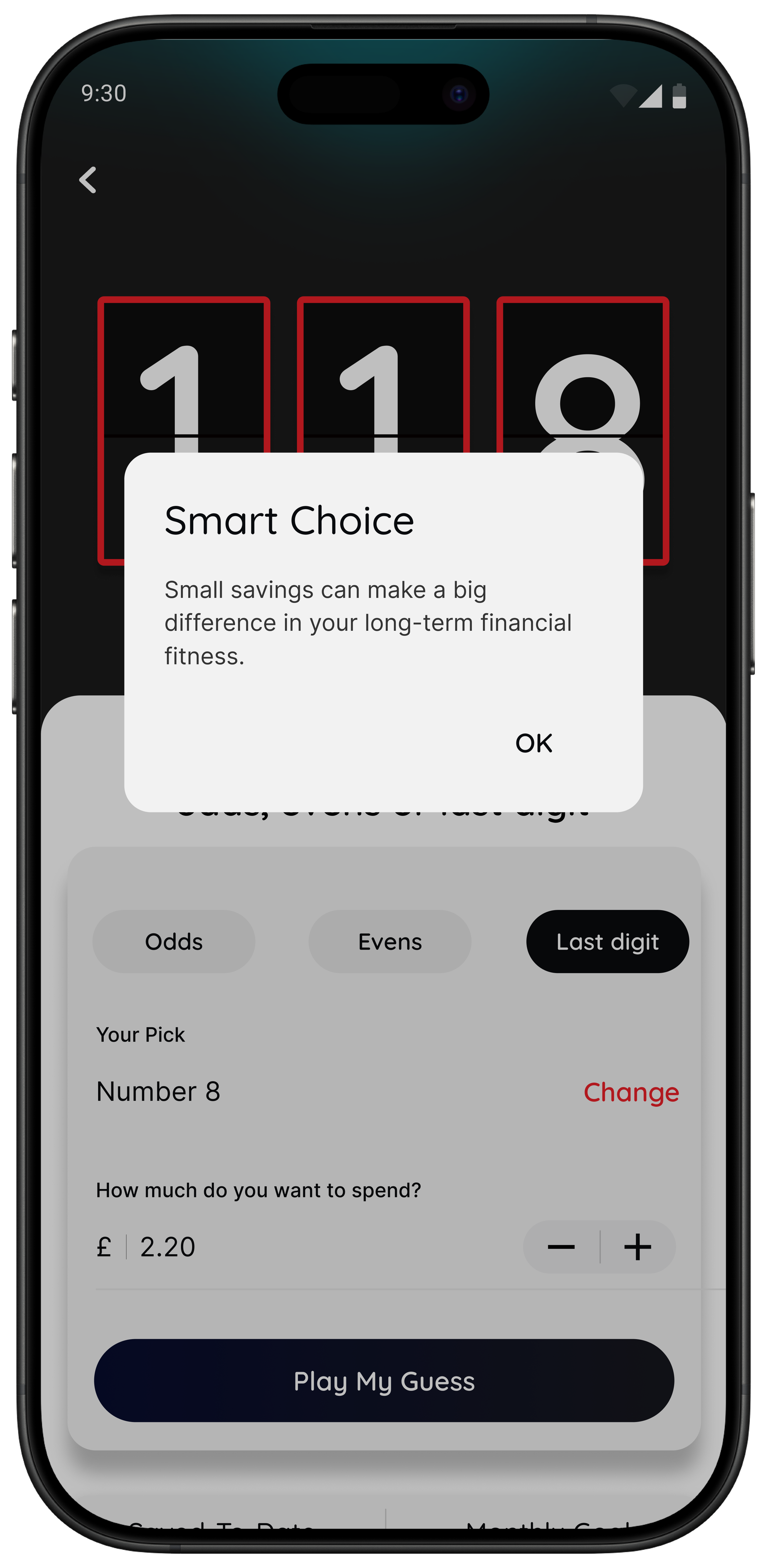
- Number Generator (Choose it): a neutral, playful pause that helps you step back.
- Saved-to-Date: track the total you could have chosen not to spend this month based on your in-game choices.
Best for: people who don’t want guilt, just a pause and a clearer choice.
Note: the Money section’s spending insights are currently available for 118 118 Money credit card customers, with broader connections planned.

Summary: the simplest stack that works for most people
If you want a calm setup you’ll keep using, start with this:
- One visibility app (budgeting/aggregation) to spot patterns weekly.
- One in-the-moment tool (118M8) to slow down checkout decisions.
- One pots habit for a specific goal (even small).
- Optional: one cashback app, used only for planned spend.
That’s enough to change your money without turning your life into a project.
About 118M8
A financial fitness mate for right-before-you-buy moments
118M8 is designed to help you spend with intention, without judgement. If your main “leak” is unplanned spending, the fastest win is usually a small pause you can repeat.
Use Wait to clock a price in hours worked, Sleep on it to get a 24-hour reminder, and the Number Generator to add a neutral moment of reflection. You stay in control, and you can track Saved-to-Date as proof that the pauses add up.
Frequently Asked Questions
What are the best apps for saving money in the UK?
The best apps depend on what you want help with. For visibility, use a budgeting or aggregation app. To reduce fixed costs, use a bill-switching service. For consistency, use savings pots. For small rewards, use cashback (carefully). For impulse spending, use an in-the-moment tool like 118M8 that adds a pause at checkout.
Do I need open banking to use money-saving apps?
No. Open banking can make transaction tracking easier, but it is not required for every type of app. If you will not connect accounts, choose tools that still work well manually or focus on decision moments rather than transaction feeds.
Which is better: cashback or cutting spending?
Cutting repeat impulse spending is usually the bigger win. Cashback can be a nice add-on for planned purchases, but it can backfire if it encourages extra spending. Many people do best with one cashback app plus one ‘pause before you buy’ habit.
How can I stop impulse spending without feeling guilty?
Treat it as a moment problem, not a character flaw. Add one short pause (10 minutes or 24 hours), translate prices into hours worked, and track small wins. You can still buy things you want. The change is buying less on autopilot.
What makes 118M8 different from a budgeting app?
Budgeting apps help after the spend by showing categories and trends. 118M8 is designed for right before you spend, with decision tools like Wait (hours worked), Sleep on it (24-hour reminder), and the Number Generator (a neutral pause). It also tracks Saved-to-Date based on your choices.
Stock images by Atlantic Money, Kelly Sikkema, Chanhee Lee, Towfiqu barbhuiya, Jakub Żerdzicki and Unsplash.